





How Do Wireless Security Cameras Get Power
2024-01-09
How are security cameras powered? The market offers a variety of security cameras, each employing distinctive power supply methods. This includes popular options like wireless security cameras, wire-free CCTV cameras, and PoE (Power over Ethernet) cameras. Deciphering how these cameras actually draw power might be challenging based solely on their names.
Understanding the power source of a security camera is a crucial aspect to explore before making a purchase for your home. This factor significantly influences your decision when choosing a specific camera.
Hence, today's article is dedicated to unraveling the power source mechanisms of wireless security cameras and guiding you in selecting the most suitable option for your home. Let's dive into the details!
Understanding the power source of a security camera is a crucial aspect to explore before making a purchase for your home. This factor significantly influences your decision when choosing a specific camera.
Hence, today's article is dedicated to unraveling the power source mechanisms of wireless security cameras and guiding you in selecting the most suitable option for your home. Let's dive into the details!
Ways Wireless Security Cameras Get Power
Before delving into technicalities, it's essential to clarify that wireless security cameras are not synonymous with being wire-free. Sounds confusing? Allow us to elaborate.
A wireless security camera earns its name not due to a wireless power supply, but rather because its video transmission is wireless. In other words, the live feed from the security camera is transmitted to a DVR/NVR or a monitor (such as a smartphone or PC) without the need for physical wires. However, it's crucial to note that the power supply for these cameras is wired.
A genuinely wire-free camera, on the other hand, doesn't rely on wires for either power or video transmission. Their method of obtaining power is distinct from that of wireless cameras.
The third category involves regular wired cameras, utilizing wires for both power supply and video transmission.
Now that we've clarified the terminology, let's explore the topic further. A wireless camera (including wire-free variants) can be powered in three different ways:
A wireless security camera earns its name not due to a wireless power supply, but rather because its video transmission is wireless. In other words, the live feed from the security camera is transmitted to a DVR/NVR or a monitor (such as a smartphone or PC) without the need for physical wires. However, it's crucial to note that the power supply for these cameras is wired.
A genuinely wire-free camera, on the other hand, doesn't rely on wires for either power or video transmission. Their method of obtaining power is distinct from that of wireless cameras.
The third category involves regular wired cameras, utilizing wires for both power supply and video transmission.
Now that we've clarified the terminology, let's explore the topic further. A wireless camera (including wire-free variants) can be powered in three different ways:
1.Electricity
2.Battery
3.Solar Energy
2.Battery
3.Solar Energy
Given that electrical power necessitates a wired connection, a wireless security camera utilizes a mains connection for power. In contrast, wire-free cameras can operate using battery power and even harness solar energy.
Let's delve into the details.
Let's delve into the details.
Wireless Security Cameras – Electrical power
When considering a wireless security camera for your outdoor spaces, it's crucial to carefully assess the distance from the power switch and the length of the camera's wire. Only after evaluating these factors can you make informed decisions about the camera's installation location.
Experts typically recommend opting for a wire-free camera, running on either battery or solar energy, especially for outdoor surveillance. Why? Firstly, outdoor cameras serve as the primary layer of your security and should operate continuously, 24/7. A simple power outage can impede real-time video transmission. Additionally, an outdoor wired camera is susceptible to tampering and destruction since cutting the electrical power source of the house can easily disable it. Moreover, frequent adjustments to the camera's location may be restricted due to limitations imposed by the power main switch.
As an alternative, you may consider keeping an Uninterruptible Power Supply (UPS) at your home to address any potential power cuts and ensure uninterrupted surveillance.
Experts typically recommend opting for a wire-free camera, running on either battery or solar energy, especially for outdoor surveillance. Why? Firstly, outdoor cameras serve as the primary layer of your security and should operate continuously, 24/7. A simple power outage can impede real-time video transmission. Additionally, an outdoor wired camera is susceptible to tampering and destruction since cutting the electrical power source of the house can easily disable it. Moreover, frequent adjustments to the camera's location may be restricted due to limitations imposed by the power main switch.
As an alternative, you may consider keeping an Uninterruptible Power Supply (UPS) at your home to address any potential power cuts and ensure uninterrupted surveillance.
Solar Energy backed – Wire-Free security cameras
True to their name, solar energy-backed security cameras operate without the need for a wired power supply. These cameras rely on a small solar panel to generate their own energy, presenting an environmentally friendly option that excels in outdoor settings.
Manufacturers typically include the solar panel with the camera, allowing users to position it directly above the camera to harness and convert energy to support the camera's operation.
Interestingly, there is a wired camera that doesn't run on electricity. Can you identify which one it is?
Wire-Free Security Cameras – Battery powered
In contemporary times, an increasing number of devices operate on battery power. The primary advantage of a battery-powered Wire-Free security camera is its independence from the availability of power in your home.
However, when considering this type of camera, a significant concern revolves around its battery life. Experts recommend opting for lithium batteries to extend the camera's operational duration. Additionally, every battery-powered wire-free camera activates only in response to motion detection, effectively conserving its battery life. These cameras are suitable for both indoor and outdoor use, offering versatility in their application.
However, when considering this type of camera, a significant concern revolves around its battery life. Experts recommend opting for lithium batteries to extend the camera's operational duration. Additionally, every battery-powered wire-free camera activates only in response to motion detection, effectively conserving its battery life. These cameras are suitable for both indoor and outdoor use, offering versatility in their application.
Wired/PoE cameras – Ethernet powered
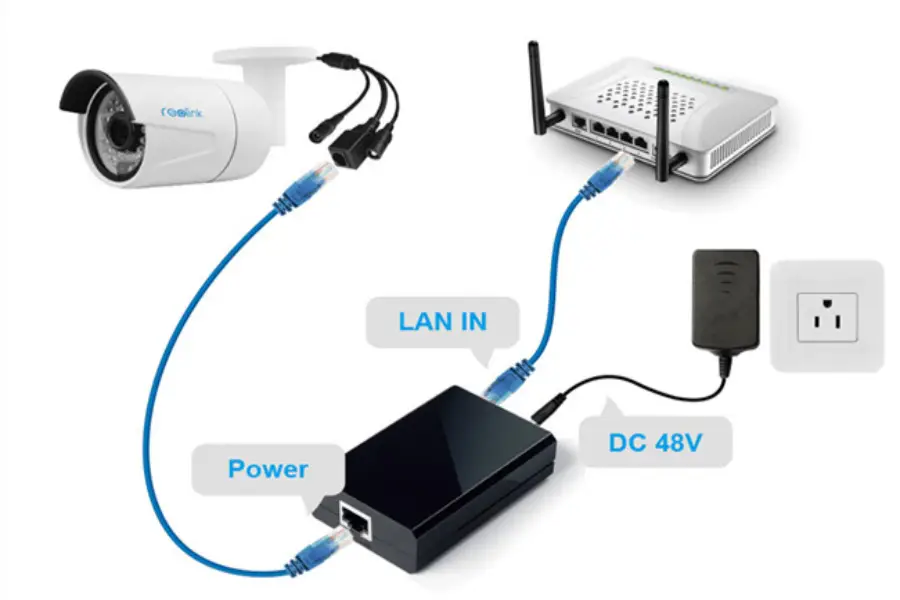
PoE, or Power over Ethernet, wired cameras utilize the Ethernet cable for both video transmission and electrical supply. The advantage is that you don't need a separate outlet for a PoE camera.
Setting up PoE cameras is straightforward, making them suitable for beginners. Additionally, these cameras prove effective in a multi-camera setup, as a single cable connection can link up to 8 PoE cameras simultaneously.
Now that you understand how wireless security cameras operate, you can make an informed decision to select the one that aligns perfectly with your needs.
For areas prone to frequent power cuts, consider the following tips:
1.Opt for solar-powered cameras.
2.Install a UPS for backup.
3.Consider using a generator.
4.Utilize battery-powered cameras and regularly replace the batteries.
2.Install a UPS for backup.
3.Consider using a generator.
4.Utilize battery-powered cameras and regularly replace the batteries.
With these considerations in mind, your home security setup is all set!
Quick Answers to All CCTV Camera Power Supply Puzzles
1.Do Security Cameras Operate Without Power?
Do wireless security cameras require power? Every security camera, whether wireless, wired, or wire-free, relies on a power source.
2.How to Power a Wireless Camera
Do wireless security cameras need to be connected to power outlets? In summary, there are three power sources for wireless security cameras:
Wire-free security cameras can operate on battery power, solar power, or a combination of both.
Other types of wireless security cameras require connection to an electric outlet for power supply.
Wire-free security cameras can operate on battery power, solar power, or a combination of both.
Other types of wireless security cameras require connection to an electric outlet for power supply.
3.Do Security Cameras Function During Power Outages?
After reviewing the information thus far, you likely have the answer in mind. Yes, it depends on the type of security cameras you use:
Battery-powered and solar-powered wire-free security cameras can continue to operate during power outages.
Wireless and wired security cameras, however, cannot function without electricity.
4.How to Power Outdoor Security Cameras (Wireless, PoE, and Wire-Free Cameras)
Battery-powered and solar-powered wire-free security cameras can continue to operate during power outages.
Wireless and wired security cameras, however, cannot function without electricity.
4.How to Power Outdoor Security Cameras (Wireless, PoE, and Wire-Free Cameras)
How do you supply power to outdoor security cameras? To elaborate further on the power supply considerations mentioned earlier, here's what you need to do to ensure your security cameras function:
For wire-free security cameras, simply insert the batteries.
If you have a wireless security camera, connect the power cable to an electric outlet.
For PoE security cameras, plug the Ethernet cable into a router.
For wire-free security cameras, simply insert the batteries.
If you have a wireless security camera, connect the power cable to an electric outlet.
For PoE security cameras, plug the Ethernet cable into a router.
 Reasons to Avoid Purchasing Inexpensive Security Cameras
  How to Protect a Cctv Camera from Rain
  What's the Difference Between 4k and 1080p?
  Benefits of Surveillance Cameras in Public Places
  How to Prevent Camera Lens from Fogging at Night
  How Long Do Security Cameras Keep Footage?
  A Guide to Hiding Security Cameras
  A Complete Guide to PTZ Controller
  Best 10 Places to Put Security Cameras
  How to Power Wireless Cameras
  How to Choose the Best Security Camera Housing
  CCTV Camera Vs IP Camera: What's the Difference?
  The Top 10 CCTV Problems You Need to Fix
  Difference Between Thermal Imaging and Infrared
  How Does a Thermal Imaging Camera Work
  A Guide to Reset PTZ Camera Settings
  How to Protect Outdoor Security Cameras like a Pro
  CCTV Meaning in Business Security
  What Are the Different Types of CCTV Camera Bracket?
  What Is the Difference Between Mainstream and Substream