





How to Power Wireless Cameras
2024-02-26
In an era where surveillance is becoming increasingly crucial for security and monitoring purposes, wireless cameras have emerged as a popular choice for homeowners and businesses alike. These cameras offer flexibility, ease of installation, and remote accessibility. However, one critical aspect that often confounds users is how to effectively power these devices. Unlike traditional wired cameras, wireless cameras rely on alternative power sources to function efficiently. In this guide, we will explore various methods to power wireless cameras, ensuring uninterrupted surveillance coverage.
There are several ways to power wireless surveillance cameras. One is to use a battery-powered camera, which can be recharged as needed. Another option is to use a solar-powered camera, which uses solar panels to charge the battery. Some cameras require a power adapter that plugs directly into an electrical outlet. If you have any questions about how to power your camera, please refer to the manufacturer's instructions.
There are several ways to power wireless surveillance cameras. One is to use a battery-powered camera, which can be recharged as needed. Another option is to use a solar-powered camera, which uses solar panels to charge the battery. Some cameras require a power adapter that plugs directly into an electrical outlet. If you have any questions about how to power your camera, please refer to the manufacturer's instructions.
1.Battery power

Wireless surveillance cameras offer unparalleled convenience and flexibility in monitoring properties, and one popular power option for them is battery power. Battery-powered wireless surveillance cameras are gaining traction due to their versatility, allowing placement anywhere without the constraints of electrical outlets or wiring. This makes them particularly suitable for outdoor settings or areas where access to power sources is limited.
Modern battery-powered wireless surveillance cameras are equipped with rechargeable batteries that boast impressive longevity, often lasting several months on a single charge. Additionally, some models feature integrated solar panels, which can replenish battery power during daylight hours, ensuring uninterrupted operation even in regions with limited sunlight exposure.
When selecting a battery-powered wireless surveillance camera, several factors warrant consideration. Firstly, assessing battery life is crucial to ensure sustained operation without frequent recharges. Furthermore, evaluating camera quality and desired features, such as motion detection, night vision, and two-way audio, aids in selecting a model that aligns with specific surveillance needs.
Cost is another pivotal aspect to ponder. Some cameras necessitate proprietary batteries, which may incur higher replacement costs, whereas others utilize standard rechargeable batteries, offering a more economical solution over time.
In conclusion, battery-powered wireless surveillance cameras offer a compelling option for individuals seeking a flexible and hassle-free monitoring solution. With advancements in battery technology, these cameras deliver dependable and enduring surveillance capabilities without the constraints of electrical infrastructure or wiring. By carefully considering factors such as battery life, features, and ongoing costs, users can make informed decisions when investing in these innovative surveillance solutions.
Modern battery-powered wireless surveillance cameras are equipped with rechargeable batteries that boast impressive longevity, often lasting several months on a single charge. Additionally, some models feature integrated solar panels, which can replenish battery power during daylight hours, ensuring uninterrupted operation even in regions with limited sunlight exposure.
When selecting a battery-powered wireless surveillance camera, several factors warrant consideration. Firstly, assessing battery life is crucial to ensure sustained operation without frequent recharges. Furthermore, evaluating camera quality and desired features, such as motion detection, night vision, and two-way audio, aids in selecting a model that aligns with specific surveillance needs.
Cost is another pivotal aspect to ponder. Some cameras necessitate proprietary batteries, which may incur higher replacement costs, whereas others utilize standard rechargeable batteries, offering a more economical solution over time.
In conclusion, battery-powered wireless surveillance cameras offer a compelling option for individuals seeking a flexible and hassle-free monitoring solution. With advancements in battery technology, these cameras deliver dependable and enduring surveillance capabilities without the constraints of electrical infrastructure or wiring. By carefully considering factors such as battery life, features, and ongoing costs, users can make informed decisions when investing in these innovative surveillance solutions.
2.Solar Power

Solar power emerges as a leading eco-friendly method to power wireless surveillance cameras, gaining popularity for its low maintenance and cost-effective attributes. This renewable energy source not only reduces reliance on grid electricity but also contributes to environmental sustainability.
Solar-powered cameras operate by capturing sunlight through solar panels, which subsequently convert it into electricity stored in a battery. This stored energy powers the camera, ensuring continuous operation even during nighttime or overcast conditions.
The latest innovations in solar-powered camera technology integrate artificial intelligence (AI) and machine learning algorithms. These advancements enhance the camera's capabilities by enabling it to detect and analyze patterns within footage, thereby improving efficiency and accuracy in identifying potential threats.
Furthermore, the flexibility of solar-powered cameras extends to their installation options. They can be deployed in remote areas devoid of electrical infrastructure, making them an optimal choice for outdoor surveillance needs. Their installation is hassle-free, requiring no wiring or drilling, thus simplifying the setup process.
In summary, solar-powered cameras present an attractive solution for individuals seeking a cost-effective, low-maintenance, and environmentally friendly means to power their wireless surveillance systems. With ongoing advancements in AI and machine learning, these cameras continue to evolve, offering heightened efficiency and precision in threat detection.
Solar-powered cameras operate by capturing sunlight through solar panels, which subsequently convert it into electricity stored in a battery. This stored energy powers the camera, ensuring continuous operation even during nighttime or overcast conditions.
The latest innovations in solar-powered camera technology integrate artificial intelligence (AI) and machine learning algorithms. These advancements enhance the camera's capabilities by enabling it to detect and analyze patterns within footage, thereby improving efficiency and accuracy in identifying potential threats.
Furthermore, the flexibility of solar-powered cameras extends to their installation options. They can be deployed in remote areas devoid of electrical infrastructure, making them an optimal choice for outdoor surveillance needs. Their installation is hassle-free, requiring no wiring or drilling, thus simplifying the setup process.
In summary, solar-powered cameras present an attractive solution for individuals seeking a cost-effective, low-maintenance, and environmentally friendly means to power their wireless surveillance systems. With ongoing advancements in AI and machine learning, these cameras continue to evolve, offering heightened efficiency and precision in threat detection.
3.Power over Ethernet (PoE)
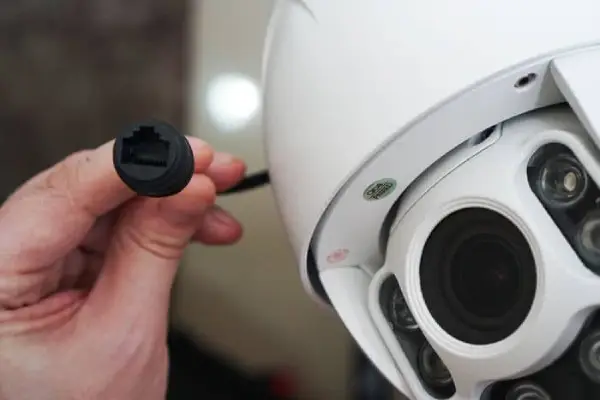
Empowering Wireless Surveillance Cameras with Power over Ethernet (PoE)
Power over Ethernet (PoE) stands out as a leading and effective method to power wireless surveillance cameras, offering both power and data transmission over a single Ethernet cable. This innovative technology eliminates the need for separate power cables and outlets, streamlining installation and enhancing versatility.
To leverage PoE, users require a PoE-enabled network switch or injector, which delivers power to the camera through the Ethernet cable. Additionally, the camera itself must be PoE-compatible. While many modern wireless surveillance cameras come equipped with built-in PoE support, older models may necessitate a separate PoE adapter for integration.
PoE boasts numerous advantages over traditional power sources for wireless surveillance cameras. Firstly, it simplifies installation by reducing cable clutter, enhancing aesthetics, and facilitating placement in areas devoid of accessible power outlets. Moreover, PoE offers a more dependable power supply, minimizing susceptibility to power surges and outages, thereby ensuring uninterrupted surveillance operations.
In recent years, PoE technology has undergone significant evolution, culminating in the emergence of the latest standard, PoE+. PoE+ delivers increased power and flexibility, capable of providing up to 30 watts of power per port. This heightened power capacity accommodates a broader array of devices, including high-powered cameras and other network peripherals.
In essence, PoE represents a dependable and efficient solution for powering wireless surveillance cameras, with ongoing advancements promising further enhancements in functionality and performance. As PoE technology continues to evolve, its allure as a power source for surveillance systems is set to increase, cementing its position as a cornerstone of modern surveillance infrastructure.
Power over Ethernet (PoE) stands out as a leading and effective method to power wireless surveillance cameras, offering both power and data transmission over a single Ethernet cable. This innovative technology eliminates the need for separate power cables and outlets, streamlining installation and enhancing versatility.
To leverage PoE, users require a PoE-enabled network switch or injector, which delivers power to the camera through the Ethernet cable. Additionally, the camera itself must be PoE-compatible. While many modern wireless surveillance cameras come equipped with built-in PoE support, older models may necessitate a separate PoE adapter for integration.
PoE boasts numerous advantages over traditional power sources for wireless surveillance cameras. Firstly, it simplifies installation by reducing cable clutter, enhancing aesthetics, and facilitating placement in areas devoid of accessible power outlets. Moreover, PoE offers a more dependable power supply, minimizing susceptibility to power surges and outages, thereby ensuring uninterrupted surveillance operations.
In recent years, PoE technology has undergone significant evolution, culminating in the emergence of the latest standard, PoE+. PoE+ delivers increased power and flexibility, capable of providing up to 30 watts of power per port. This heightened power capacity accommodates a broader array of devices, including high-powered cameras and other network peripherals.
In essence, PoE represents a dependable and efficient solution for powering wireless surveillance cameras, with ongoing advancements promising further enhancements in functionality and performance. As PoE technology continues to evolve, its allure as a power source for surveillance systems is set to increase, cementing its position as a cornerstone of modern surveillance infrastructure.
4.Hardwired Power Supply
Although wireless cameras eliminate the need for extensive wiring, some users prefer to connect them to a constant power source for uninterrupted operation. Hardwiring wireless cameras involves running power cables from an electrical outlet to the camera location. This method ensures a reliable power supply without the hassle of frequent battery replacements or solar panel adjustments. Moreover, hardwired cameras may offer additional features such as continuous recording and remote access to live feeds. However, professional installation may be required to conceal wiring and ensure compliance with electrical codes.
5.Battery Backup
In scenarios where power outages are common or during emergencies, having a backup power source is essential to ensure continuous surveillance. Battery backup systems can be paired with wireless cameras to provide temporary power during outages. These systems typically consist of rechargeable batteries and an automatic switchover mechanism that activates when the main power supply fails. Battery backup solutions offer peace of mind by maintaining surveillance operations during unforeseen disruptions, safeguarding properties and assets.
In conclusion, powering wireless cameras involves careful consideration of various factors such as location, accessibility, and reliability. Whether opting for battery-powered, solar-powered, hardwired, PoE-enabled, or battery backup solutions, users must prioritize their specific requirements and operational needs. By choosing the right power source and implementing appropriate installation practices, users can ensure efficient and uninterrupted surveillance coverage for enhanced security and peace of mind.
Remember, the effectiveness of a wireless camera system depends not only on its features but also on the reliability of its power source. So, make an informed decision and power your wireless cameras for seamless surveillance.
Remember, the effectiveness of a wireless camera system depends not only on its features but also on the reliability of its power source. So, make an informed decision and power your wireless cameras for seamless surveillance.
 Reasons to Avoid Purchasing Inexpensive Security Cameras
  How to Protect a Cctv Camera from Rain
  What's the Difference Between 4k and 1080p?
  Benefits of Surveillance Cameras in Public Places
  How to Prevent Camera Lens from Fogging at Night
  How Long Do Security Cameras Keep Footage?
  A Guide to Hiding Security Cameras
  A Complete Guide to PTZ Controller
  Best 10 Places to Put Security Cameras
  How to Choose the Best Security Camera Housing
  CCTV Camera Vs IP Camera: What's the Difference?
  The Top 10 CCTV Problems You Need to Fix
  Difference Between Thermal Imaging and Infrared
  How Does a Thermal Imaging Camera Work
  How Do Wireless Security Cameras Get Power
  A Guide to Reset PTZ Camera Settings
  How to Protect Outdoor Security Cameras like a Pro
  CCTV Meaning in Business Security
  What Are the Different Types of CCTV Camera Bracket?
  What Is the Difference Between Mainstream and Substream